
A RAG architecture diagram is a visual map of how retrieval-augmented generation processes a user query, searches external knowledge sources, completes retrieval steps, crafts an updated prompt, and provides an LLM-generated response.
Instead of showing AI as a black box, the diagram makes each part of the system visible from where information is stored to how it is selected, and how it helps the model generate a better answer.
In this guide, we’ll define RAG, walk through a typical RAG workflow, explain why diagrams matter, compare common diagram types, and show how Gliffy can help teams visualize generative AI architecture in Confluence.
Back to topWhat Is RAG, or Retrieval-Augmented Generation?
RAG stands for retrieval-augmented generation, an AI framework that improves LLM responses by retrieving relevant information from external sources and using that context to generate a more useful, accurate answer.
First, the system retrieves relevant information from trusted sources such as internal documentation, product specs, support articles, Confluence pages, databases, PDFs, or other enterprise content.
Then, it sends that context to a large language model, which can generate an answer grounded in information beyond its original training data.
RAG is especially valuable when a response depends on current, proprietary, or domain-specific information that may not be available in a model’s static training data. For businesses, that means AI assistants can answer questions using the information teams already rely on every day rather than only drawing from broad, generalized knowledge.
Back to topHow Does Retrieval-Augmented Generation Work?
Retrieval-augmented generation works by adding a search-and-context layer before the model generates a response. Instead of asking an LLM to answer from memory alone, a RAG system looks for relevant information first, prepares that information as context, and then asks the model to respond using both the original question and the retrieved material.
A simple RAG workflow usually includes these steps:
- User query: A person asks a question in natural language.
- Retrieval: The system searches connected data sources or a vector database for relevant content.
- Context selection: The most useful passages, documents, or objects are selected and prepared.
- Prompt augmentation: The user’s question is combined with the retrieved context to create a richer prompt.
- Generation: The LLM generates a response grounded in the retrieved information.
The key distinction is that retrieval finds the supporting evidence, while generation turns that evidence into a useful response.
Back to topWhy Does RAG Matter for LLM Accuracy?
RAG improves LLM accuracy by grounding generated answers in relevant external data rather than relying only on static training data.
Large language models are powerful, but they can be limited by the data they were trained on. Training data can become outdated, omit private business information, or lack the depth needed for specialized use cases. RAG helps close that gap by giving the model access to relevant information at query time.
That matters for accuracy because the model does not have to rely only on what it already “knows.” It can reference source material from approved knowledge bases, documentation, tickets, or databases before generating a response. This can reduce unsupported answers, improve relevance, and make outputs easier for teams to trust and verify.
Back to topWhy Create a RAG Architecture Diagram?
A RAG architecture diagram helps teams turn a complex AI workflow into an easy-to-understand visual. It shows how a user query moves through the system, which knowledge sources are searched, where retrieval happens, how context is added to the prompt, and how the final AI response is generated.
That visibility is useful for both technical and non-technical stakeholders. Engineers can use the diagram to plan retrieval logic, data preparation, permissions, and model interactions. Product, security, support, and content teams can use it to understand what information powers the system and where questions may arise.
Diagrams are also helpful for onboarding, documentation, stakeholder alignment, and troubleshooting. A clear RAG diagram can reveal missing data sources, unclear ownership, weak retrieval paths, or bottlenecks before those issues affect users.
Back to topHow to Create a RAG Architecture Diagram
Use these steps as a starting point for your RAG architecture diagram:
- Start with the user query. Place the user or application interface at the beginning of the diagram.
- Map the retrieval layer. Show where the system searches for information, such as a vector database, document repository, API, or enterprise knowledge base.
- Show data preparation. Include chunking, indexing, filtering, or reranking if the diagram needs to be more technical.
- Add prompt augmentation. Show how retrieved context is combined with the original question.
- Connect to the LLM. Represent the model that generates the final response.
- End with the response. Show the answer returned to the user, ideally with citations, links, or source references if the system supports them.
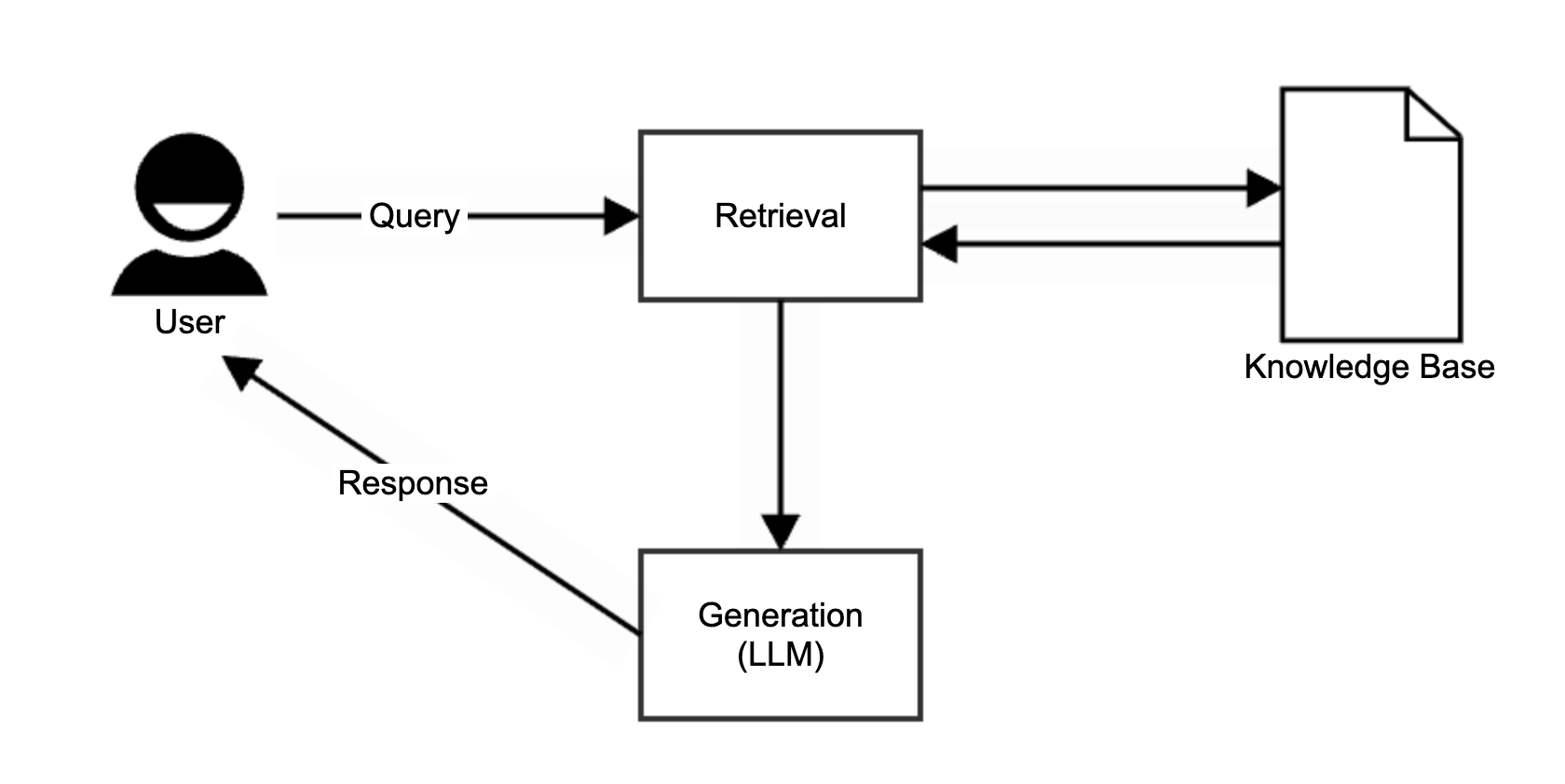
Example of a simple RAG architecture diagram
Once the basic flow is in place, tailor the level of detail to your audience. Executives may only need a high-level system flow, while engineering or security teams may need to see data preparation, permissions, logging, evaluation, and fallback paths. Interactive diagrams allow you to build one diagram that is suitable for all audiences.
Back to topTypes of RAG architecture diagrams
Common RAG architecture diagram types include:
- Simple RAG diagram: Best for explaining the basic flow from query to retrieval to generation.
- RAG with memory: Shows storage that allows the system to reference previous interactions.
- Branched RAG diagram: Shows multiple retrieval sources and decision logic for choosing the most relevant context, such as product documentation, tickets, knowledge bases, or customer data.
Real-World Examples of RAG Architecture
RAG architecture shows up in many AI-powered workflows. A customer support chatbot may retrieve help center articles before answering a question, an internal AI assistant may search company documentation, and a software team assistant may search product specs, engineering tickets, and release notes to answer questions about a feature.
In an enterprise setting, tools like Atlassian Rovo show why this kind of architecture matters. Rovo connects knowledge across Confluence, Jira, Slack, and other enterprise apps so teams can search once and get trusted, team-specific insights.
Back to topHow Gliffy Can Help Visualize RAG Architecture
There are three paths for creating a RAG Architecture Diagram with Gliffy.
- Build From Scratch
Start with a blank canvas or a template in the Gliffy editor, then drag shapes from the architecture, software, network, or basic shape libraries onto the canvas. Label the components, connect them to show how queries and data move through the RAG workflow, and use formatting, themes, and layers to make the diagram easy to understand. - Use AI in the Gliffy Editor
Open Gliffy in Confluence, select the AI option in the editor, and describe the diagram you want in plain language. Include the key components, labels, and relationships—for example, a user query connected to a retriever, vector database, prompt builder, LLM, and response. Gliffy AI creates an editable first draft that you can refine in the Mermaid editor or convert to a classic Gliffy diagram for direct shape-by-shape editing. - Use Existing Confluence Context via the Gliffy Rovo Agent
Open Rovo Chat in Confluence and select the Gliffy Diagram agent. Ask it to turn the current page containing the information about your RAG architecture into a diagram. Rovo reviews the available context and proposes a structure for confirmation; once approved, Gliffy creates a native, editable diagram and adds it to the Confluence page. This path reduces manual prompting and keeps the visual connected to the documentation that informed it.