Blog
February 6, 2026

With Atlassian Data Center end-of-life approaching in 2029, ending security patches, support, or bug fixes for all products, thousands of organizations face a critical decision: which Cloud environment is right for my team?
This decision impacts security, compliance, and long-term costs—and choosing the wrong environment could mean costly re-migration later.
In the past, there wasn’t a choice to make. Atlassian offered only one Cloud solution (which we’ll refer to as “Commercial Cloud” throughout this comparison).
But since many current customers originally chose Data Center due to security and compliance needs not met by Commercial Cloud, ending support for it required Atlassian to offer Cloud solutions that they can migrate to safely and legally.
In this blog, I’ll briefly go into what each Atlassian Cloud option (Commercial, Isolated, and Government) offers your team, and provide guidance on how to decide which one aligns most closely with your needs.
Back to top
Option 1: Atlassian Commercial Cloud
Ideal User
Commercial Cloud is by far the most popular and versatile Cloud option offered by Atlassian. Teams of all sizes and industries use Atlassian Commercial Cloud to create alignment and increase efficiency, from enterprise organizations to small but mighty teams of under 10 users.
Key Features
- Access to New Features: When Atlassian introduces new, innovative features, they will come to Commercial Cloud first.
- Full Product Suite: All of Atlassian’s products have Commercial Cloud offerings, while the others are currently limited to Confluence, Jira, and Jira Service Management.
Option 2: Atlassian Isolated Cloud
Ideal User
Isolated Cloud is intended for customers with the highest requirements for data control, typically those working within highly regulated industries, like finance.
Key Features
- Single-Tenant Architecture: Each customer gets their own dedicated instance of Atlassian Cloud products.
- Customer-Specific Hosting: Each customer’s dedicated Cloud instance is deployed in a region of the customer’s choosing.
- Stricter Access Controls: Support for hardened security postures, including restricted support access, custom encryption controls, and network isolation.
Option 3: Atlassian Government Cloud
Ideal User
Government Cloud is intended for U.S. government agencies and industry partners. Atlassian has committed to continue developing this solution to meet the highest level of federal compliance.
Key Features
- FedRamp Moderate Authorization: Adheres to controls and security measures required by the U.S. government.
- Government-Specific Environment: Government Cloud is a separate environment dedicated for U.S. government agencies and industry partners.
Determining the Right Atlassian Cloud Solution for Your Team
Now that you have an idea of what each of Atlassian’s Cloud options provide, let’s dive further into what the decision-making process might look like. To illustrate, I’ll use an example of another important decision that requires consideration of security, budget, and function: choosing a place to live.
Think of Commercial Cloud like living in a well-managed apartment building. You have your own secure space, professional maintenance (Atlassian manages updates and security), and shared amenities (infrastructure) that keep costs down.
While you share the building with other tenants, robust security measures ensure no one can 'see into your apartment.'
Choose Commercial Cloud if:
- You need access to the full Atlassian product suite
- You want the latest features first
- Standard security measures meet your needs
- Cost-effectiveness is a priority
Isolated Cloud is like having your own private floor with a dedicated entrance—more control and customization, but at a premium.
Choose Isolated Cloud if:
- You're in finance, healthcare, or other highly regulated industries
- You require data residency in specific regions
- You need single-tenant architecture for compliance
- You have strict network isolation requirements
Government Cloud is like a secure government facility with the strictest access protocols.
Choose Government Cloud if:
- You're a U.S. government agency or contractor
- You require FedRAMP authorization
- You handle CUI (Controlled Unclassified Information)
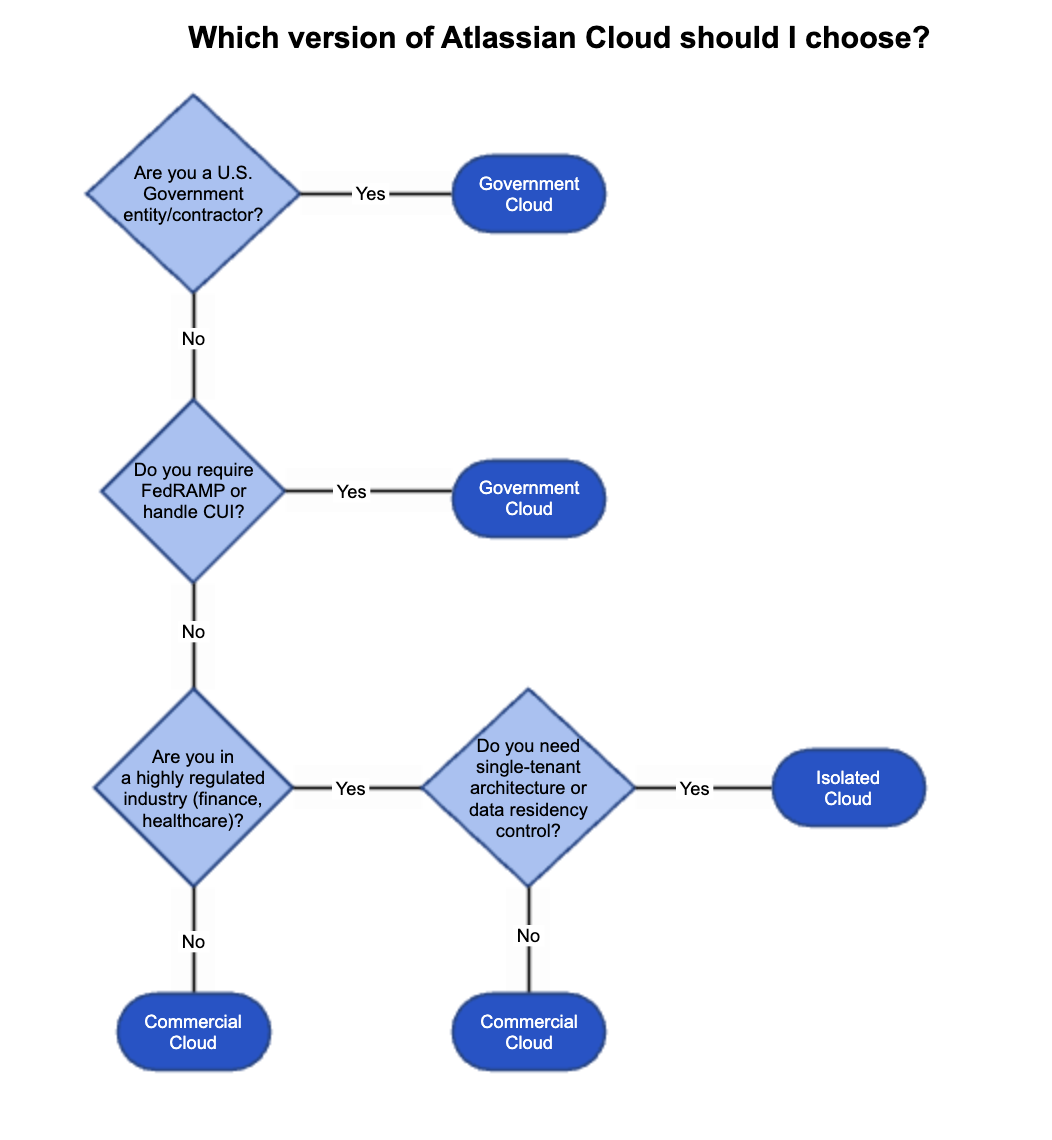
This decision tree diagram summarizes the most important factors in determining the right Atlassian Cloud option for your team:
 Back to top
Atlassian Migration Resources: Before, During & After
A key part of preparing for migration is deciding which apps and add-ons you’ll take to Cloud. That includes understanding whether your current add-ons will function the way you need them in Cloud and whether they will be able to meet your security and compliance needs.
You should also make sure you’re familiar with your options for specialized migration assistance, such as Atlassian’s FastShift program, which is available for Data Center customers with over 1,000 users.
Once you have a migration scheduled, I recommend using our Gliffy Cloud migration guide to ensure that your diagrams migrate smoothly along with the rest of your content.
Then, once your migration is complete, your team can start to get familiar with the new benefits of operating in Cloud, like Gliffy’s AI diagramming functionality and Rovo/Atlassian Intelligence.