
What Are Confluence Whiteboards?
Confluence whiteboards is Atlassian’s built-in whiteboarding feature for Confluence Cloud, allowing teams to capture and develop ideas collaboratively.
Confluence Whiteboards were first introduced to customers in beta in 2023, and in March 2024, Atlassian began rolling this feature out to all Confluence users. Today, you can create a Whiteboard in Confluence Cloud the same way you would create a new page.
It’s no surprise that Atlassian saw value in adding whiteboarding functionality to Confluence. Since remote and hybrid work have become more common, gathering around a whiteboard in person isn’t a possibility anymore for many teams.
As part of Atlassian's mission to become a remote-friendly workspace for teams located across the world, Confluence now provides a creative digital space to replace the physical whiteboard.
Back to topConfluence Whiteboard Features
Confluence whiteboards offer the typical functionality that you would expect from any digital whiteboard tool: you can create sticky notes; add text, shapes, and lines; and collaborate with your teammates in real time.
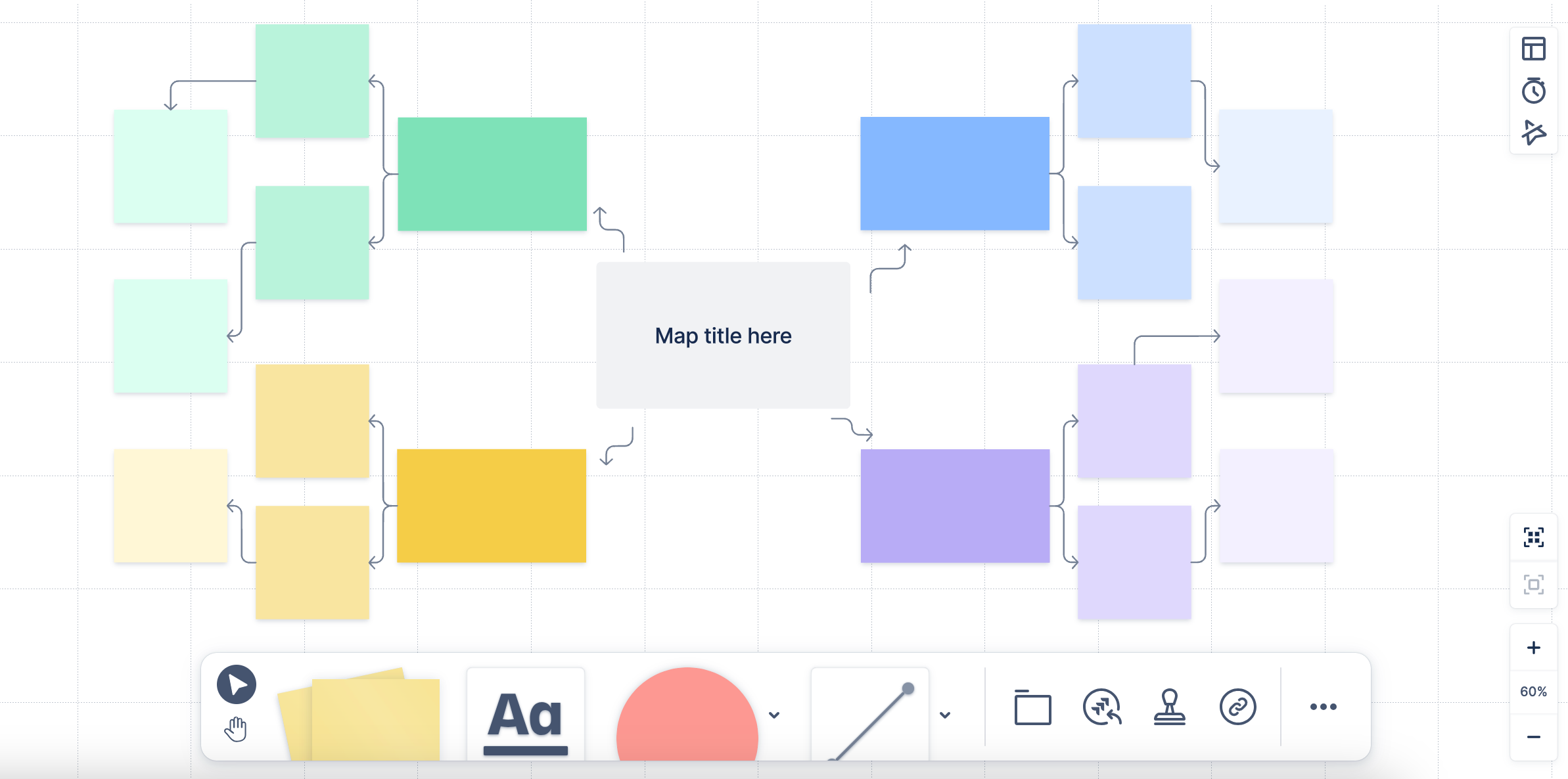
Additionally, you can react to elements of the whiteboard with emoji-like “stamps,” set a timer to help facilitate your team’s brainstorming session, and create Jira issues directly from a whiteboard.
All these features make Confluence Whiteboards a helpful tool for sharing ideas and hosting real-time brainstorming sessions.
Back to topDo I Really Need A Separate Diagramming Tool?
Confluence Whiteboards are a great lightweight tool for quick collaboration, but if you’re using Confluence to build mission-critical documentation, your team will require a tool with more technical ability.
Back to topWhen to Use Confluence Whiteboards
Creating Jira Issues
Gliffy doesn’t allow you to create Jira issues directly from a diagram, so if your goal for your brainstorming session is to come up with a list of action items and assign them in Jira right away, then Confluence whiteboards is a good option for you.
Brainstorming Sessions
Gliffy does have real-time collaboration capabilities, and whiteboarding features like sticky notes that make it easy to create or edit a diagram with your team, but Confluence’s made-for-brainstorming whiteboard tool adds features like the built-in timer and ability to create Jira issues.
Agile Ceremonies
Similar to brainstorming sessions, Agile ceremonies require real-time collaboration and often have timing elements, so you may want to use Confluence whiteboards to hold your team’s ceremonies for the same reasons you’d use them for a brainstorming session. Confluence whiteboards also have templates for a variety of common Agile ceremonies, like Kanban boards, sprint planning, and retrospectives.
Back to topWhy Confluence Whiteboards Won’t Cut it for Mission-Critical Documentation
Although Confluence whiteboards are great for collaboration, they do not offer the same advanced level of functionality for technical diagramming that Gliffy does. If you need to communicate complex concepts visually, Gliffy is still your go-to tool.
No Code-Based Diagramming
Confluence Whiteboards don’t offer any code-based diagramming functionality. While you can get by dragging and dropping shapes onto a whiteboard, your team will save hours by writing or generating code that represents a diagram in a language they’re familiar with.
Generating Diagrams from Code in Confluence
Gliffy lets you create technical diagrams from code using Mermaid markdown, so you can document systems and databases faster than you could by dragging, dropping, and connecting shapes manually.
Just write or generate the text that represents the way you want your diagram to look, paste it into Gliffy’s Mermaid editor, and generate your diagram for a detailed visual that doesn’t require hours of work and the mental energy of arranging everything properly on the page.
With Mermaid, your technical experts will save time and produce more effective documentation. Then, your team is better equipped to focus on higher priorities, go to market faster, and improve onboarding and customer service.
No Layer or Multipage Support
Will your team be able to thoroughly document processes or dependencies without multiple pages or layers? The simplicity of Confluence Whiteboards doesn’t allow for the level of detail an in-depth process or system diagram can require.
When you’re working with complex information, a lack of support for complex diagram structures can easily lead to frustration and miscommunication.
How to Diagram with Layers and Multiple Pages
Gliffy offers layering and multipage support, neither of which are available in Confluence Whiteboards, to help your team keep ideas organized and present information clearly.
No UML Notation on AI-Generated Diagrams
Confluence Whiteboards offer a “Smart Create” feature, powered by Rovo, which can generate flowcharts and mind maps based on your input. However, this functionality has limitations when it comes to technical diagrams that require specific notation.
Generate UML Diagrams with AI
Gliffy’s AI diagramming feature functions similarly, but can generate technical diagrams with proper UML notation—a faster and more effective solution for developers and engineers.
Limited Version Control
What happens if you need to provide documentation to auditors covering the past year of your team’s work? 30 days of revision history, available in a Confluence Whiteboard, won’t cut it.
Ensure Your Diagrams Have Unlimited Version Control
A Gliffy diagram’s revision history is unlimited, so you can refer to previous versions of a system or process whenever you need it.
Limited Technical Diagramming Templates & Shape Libraries
In theory, you can create a network diagram or architecture diagram in Confluence Whiteboards by uploading all your own images and symbols, but that takes extra time you might not have.
Relying solely on Confluence Whiteboards, with its limited technical diagramming shapes and templates, can lead to time-consuming workarounds, inconsistent visuals, and potential misunderstandings.
Save Time on Technical Documentation with Built-in Shapes and Templates
Gliffy, with its comprehensive library of technical diagramming templates, empowers teams to quickly produce polished and consistent diagrams, streamlining workflows and ensuring critical documentation is completed without delay.
Gliffy has a wide variety of built-in shape libraries, like AWS, BPMN, and more, so you don’t have to upload anything manually unless you want to include specific symbols or logos that are unique to your organization.
Gliffy also allows you to use the specific types of lines required for UML, entity-relationship, and other diagram types that you won’t find in Confluence whiteboards.
Back to topGet Technical Diagramming without the Tradeoffs
Although Confluence Whiteboards and Gliffy do cover some of the same use cases, they’re ultimately different tools that serve different purposes. With the help of this guide and our Gliffy vs. Confluence whiteboards comparison chart, you can evaluate which tool best meets your team’s needs for certain use cases.
With Gliffy, you get best-in-class technical diagramming without the headaches of a “good enough” tool.
However, you will need to add Gliffy on the Atlassian Marketplace to start creating advanced technical diagrams. It’s free to get started, so you can see firsthand how an advanced diagramming tool changes the way you do documentation and keeps your team on track.